As of Suricata 2.1beta1 - Suricata IDS/IPS provides the availability of high performance/advanced tuning for custom thread configuration for the IDS/IPS engine management threads.
Aka ..these
[27521] 20/7/2014 -- 01:46:19 - (tm-threads.c:2206) <Notice> (TmThreadWaitOnThreadInit) -- all 16 packet processing threads, 3 management threads initialized, engine started.
These 3 management threads initialized above are flow manager (1), counter/stats related threads (2x)
So ... in the default suricata.yaml setting we have:
and we can choose accordingly of how many threads we would like to dedicate for the management tasks within the engine itself.
flow:
memcap: 64mb
hash-size: 65536
prealloc: 10000
emergency-recovery: 30
#managers: 1 # default to one flow manager
#recyclers: 1 # default to one flow recycler thread
The recyclers threads offload part of the flow managers work and if enabled do flow/netflow logging.
Good !
What does this has to do with performance?
Suricata IDS/IPS is powerful, flexible and scalable - so be careful what you wish for.
The examples below demonstrate the effect on a 10Gbps Suricata IDS sensor.
Example 1
suricata.yaml config - >
flow:memcap: 1gbhash-size: 1048576prealloc: 1048576emergency-recovery: 30prune-flows: 50000managers: 2 # default is 1
CPU usage ->
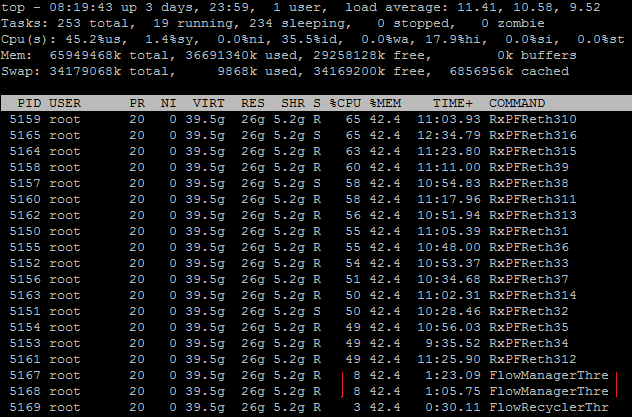
2 flow management threads use 8% CPU each
Example 2
suricata.yaml config - >
flow:memcap: 4gbhash-size: 15728640prealloc: 8000000emergency-recovery: 30
managers: 2 # default is 1
CPU usage ->

2 flow management threads use 39% CPU each as compared to Example 1 !!
So a 4 fold increase in memcap, 8 fold increase in prealloc and 15 fold increase on hash-size settings leads to about 3 fold increase in RAM consumption and 5 fold on CPU consumption - in terms of flow management thread usage.
It would be very rare that you would need the settings in Example 2 - you need huge traffic for that...
So how would you know when to tune/adjust those settings in suricata.yaml? It is recommended that you always keep an eye on your stats.log and make sure you do not enter emergency clean up mode:
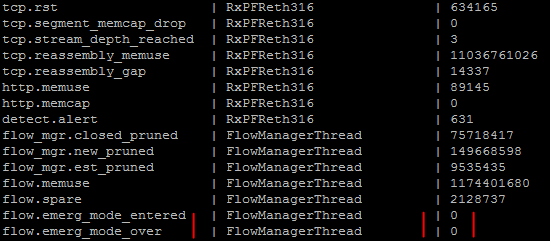
it should always be 0
Some additional reading on flows and flow managers -
http://blog.inliniac.net/2014/07/28/suricata-flow-logging/
